



Make a readable page, not a tiny poster
A whole-pattern picture is useful for checking the design. It may be too small to follow square by square. Use chart pages with symbols you can tell apart at your stitching table. Start by printing a page that has several different symbols and compare it with the thread key. Check it under the light you will actually use.
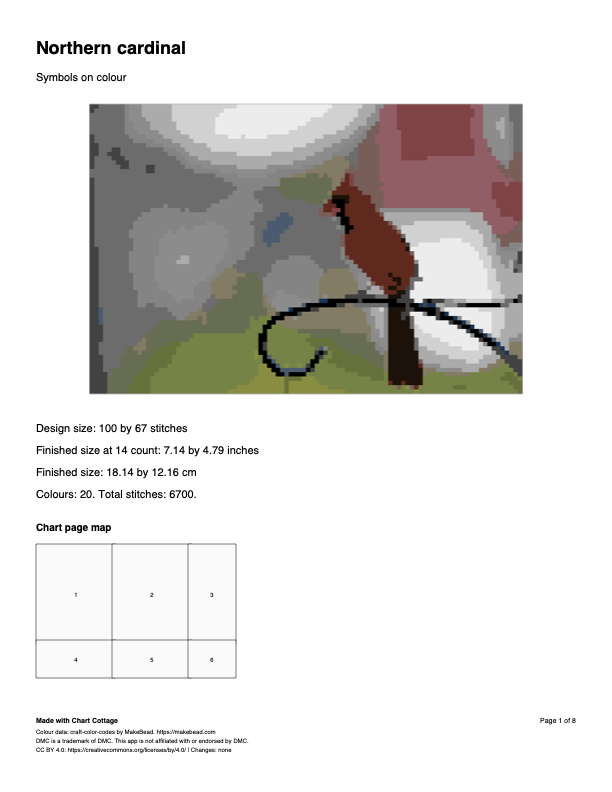
The cardinal shown above is 100 by 67 stitches. The engine's standard chart layout produces 6 chart pages on Letter and 6 on A4 for that grid. Those are chart pages, separate from the cover and key. The pattern has 6700 stitches even though some squares appear again at page joins.
Overlap is a guide, not more stitching
Line up the repeated edge with the neighbouring page. Mark the boundary you plan to follow so you do not stitch that strip again. Work from the chart coordinates and page map rather than counting from an arbitrary paper edge. Keep the key nearby even if you tape the chart pages together.
When a seam passes through a thin branch or a face, compare the same symbols on both pages before continuing. If the pages do not match, check the page order and print scaling. Do not compensate by shifting the stitches on the fabric.
Letter versus A4
Select the paper that is in your printer and keep the same choice in the print dialog. Check that the bottom rows, side labels and symbols are present on the test sheet. Printer margins vary. If the output is clipped, resolve the paper or scaling setting before printing the rest. Do not assume every PDF layout uses the same number of squares on a sheet.
Turn the key into a shopping check
The measured cardinal has 20 used shades and 20 whole skeins to buy when every shade is rounded up. That does not mean it uses every skein in full. Check the DMC code against your stash. A partly used skein may cover a small row, but its remaining length is something you need to judge.
Read strands and fabric count before buying. A different count or longer carrying paths can change the amount used. Keep the estimate with the chart so you know which settings it describes. The JSON linked below includes each thread's stitch total, length estimate and rounded buying quantity.